Learn how to store cookies and local storage
# Store cookies
When using websites that make use of stored data within your browser, such as cookies or local storage, it may be beneficial to pull these pieces of data into your Axiom.ai automation. The "Store cookies" option allows you to share session data with your cloud runs. All cookies and local storage data is encrypted, have an expiration data and will need manual renewing when they expire.
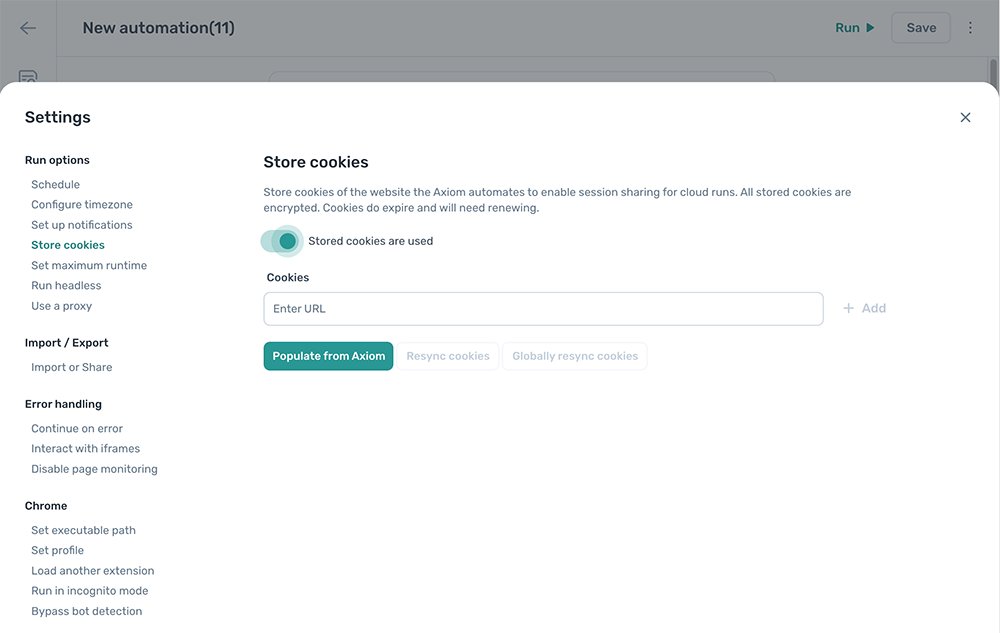
By default, cookies that are stored locally will be used within your automation. Setting this option to "Stored cookies are used" enables the use of cookies and local storage within your cloud runs.
When enabled, we recommend enabling Run notifications to be notified if the automation fails due to an expired cookie or local storage session.
# Configuration
This setting can be configured to meet your specific requirements.
# Adding a URL
Entering a URL into the "Cookies" field will allow you to add a new URL to this option, once you have inserted a valid URL, click "+ Add" to save this URL.
Clicking "Populate from Axiom" will add any sites that are used within your automation into this setting. For example, if you use "https://google.com/" in a Go to page step, this will be populated into this list. If a website has not been added automatically, you can still enter the URL manually.
Note, some sites use different subdomains to handle their authentication, such as "login.example.com", you may need to manually add this URL if it has not been automatically been recognised.
# Resync cookies
Copy over and store the cookies from your local machine that are used within this automation.
# Globally resync cookies
Copy and store the cookies from your local computer are used by this automation. Additionally, copy them to all of your automations that are using the same cookies.
# URLs
URL: Reviewing the URL that is stored is important - this is the URL that will be used to load the cookies and local storage. Confirm that this is the correct URL to use it within your automation.
Cookies shared: Enabled by default, this will enable the sharing of cookies with your cloud runs.
Local storage shared: Disabled by default, this will enable the sharing of local storage sessions with your cloud runs. For most sites this is not required, however, if cookies do not contain the information required, this can help. Enabling this may slow down page loading.
Auto resync: Disabled by default, this will resync your stored cookies from the browser opened during the automation whenever your automation is run. This is an experimental setting and very rarely needed, only consider using this if your stored cookies regularly expire within 48 hours.
Delete: Delete the cookies and local storage related to this URL.